
Sign Up / Register
Create your account on Digital’s Flare in seconds. Watch this quick video guide to complete registration.
Tip: Use the same email for payments and LMS login to avoid delays.

Follow these simple steps to register, confirm payment, join the class group and start your course.
Create your account on Digital’s Flare in seconds. Watch this quick video guide to complete registration.
Tip: Use the same email for payments and LMS login to avoid delays.
Browse courses and place your order. Here's a 5-minute video showing how to select and purchase a course.
Tip: Check course start date and available batches on the course page before paying.
After placing your order, share a screenshot of the payment and your order slip (showing the order number) with our Coordinator on WhatsApp.
Wait up to 24 hours for verification and admission confirmation.
Ask the Coordinator for the Flarian Membership Form to join the student community.
Flarian membership is free and gives you access to exclusive student benefits.
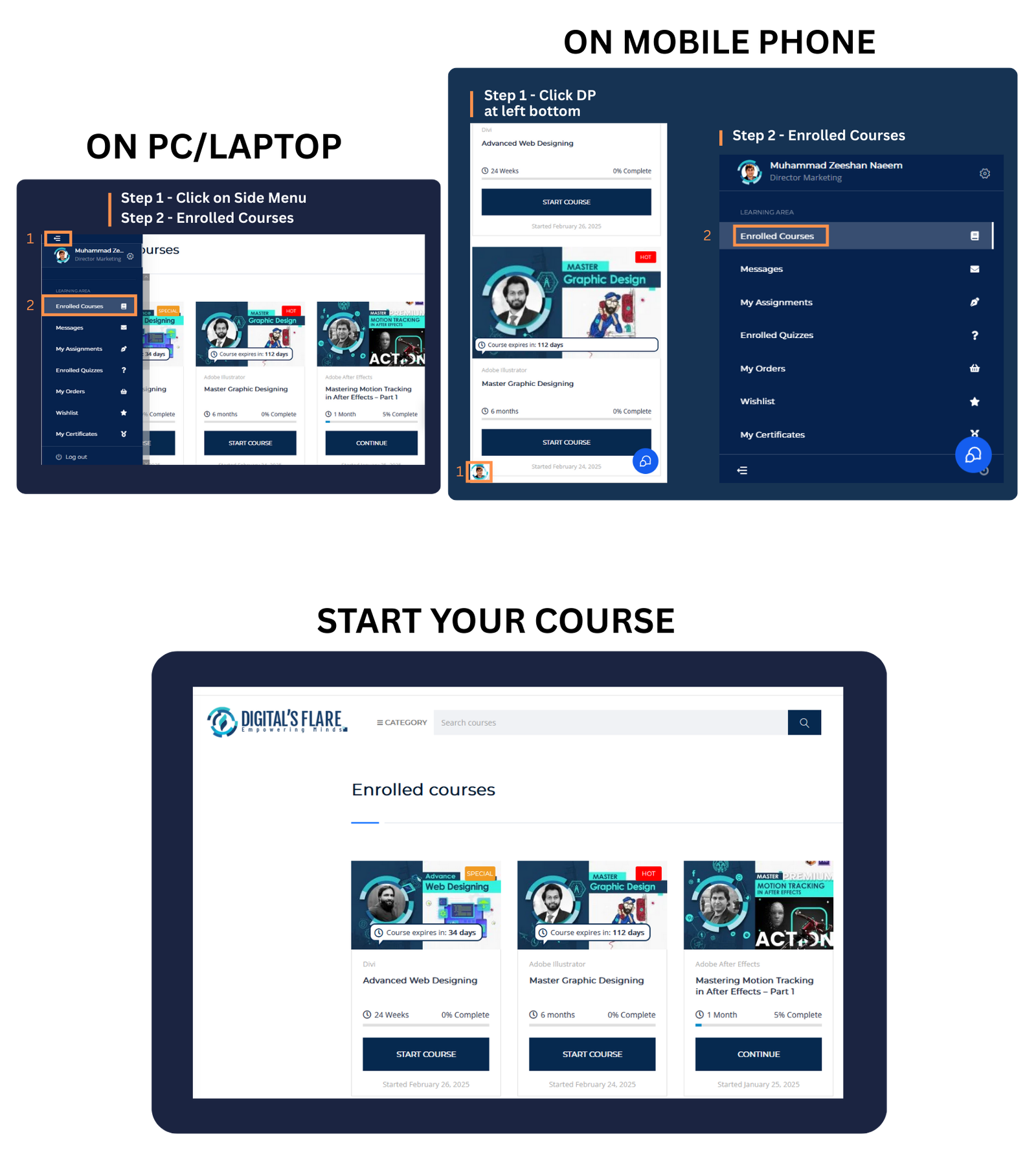
After approval, log in and go to Side Menu → Enrolled Courses.
-Start lecture 1,
-Submit its assignment,
-and unlock the next lecture on passing.
Note: Each next lecture unlocks after you pass the previous assignment — this ensures real learning and progress.